
WhatsApp order automation sends order confirmations, follow-ups, and shipment updates from your Shopify store without anyone typing a message. It replaces the repeated work of confirming each order by hand. For a store handling 50 or more COD orders a day, manual confirmation alone consumes roughly two to three staff hours daily.
Every manual WhatsApp message you send to confirm an order, chase a non-responder, or update a customer on delivery is a few minutes gone. Multiply that across dozens or hundreds of orders a day and it becomes most of someone’s working day — time that could go toward packing, sourcing, or growing the store.
The Real Cost of Manual Order Follow-Ups
Manual confirmation texts do not scale. Someone has to remember to send them, track who replied, and update the system afterward. Miss a step and you either ship an unconfirmed order or delay a confirmed one. For COD stores specifically, every unconfirmed order that ships is a gamble — packaging costs, delivery fees, and rider time spent on a customer who may never answer the door. Automating the confirmation step removes that gamble at the source.
What Automation Actually Replaces
Before automation a typical COD cycle looks like this: order comes in, staff member manually texts the customer, waits, updates a spreadsheet, flags for packing. If the customer does not reply, someone follows up again later. With automation the cycle is: order comes in, ConfirmQ sends a WhatsApp poll immediately, customer replies Yes or No, response is logged automatically, and your team sees a clean confirmed-vs-pending list with zero manual input.
| Task | Done manually | Automated with ConfirmQ |
|---|---|---|
| Order confirmation | Typed out per order | Sent the moment the order is placed |
| Chasing non-responders | Remembered, or forgotten | Follow-up fires on a set delay |
| Recording the reply | Copied into a sheet | Tagged onto the Shopify order |
| Shipment updates | Sent one by one | Triggered by fulfilment status |
| Abandoned carts | Rarely actioned | Reminder sent automatically |
| Daily time at 50+ orders | Roughly 2-3 staff hours | Near zero |
Automation Flows: Set It Once, Let It Run
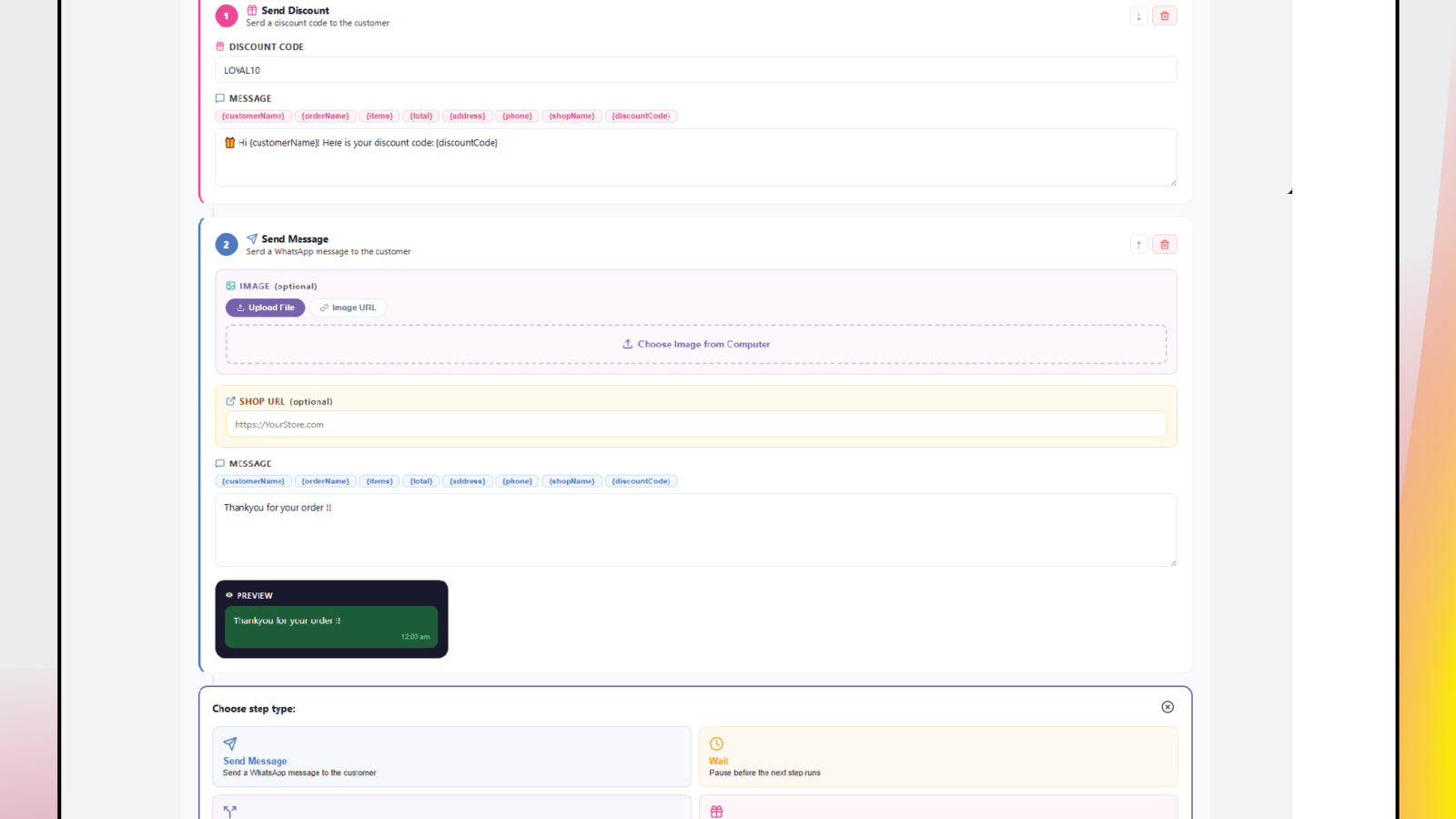
ConfirmQ Automation Flows let you build a workflow once and run it on every order. Choose a trigger, add conditions, set a delay, and ConfirmQ sends the right WhatsApp message at the right time. A few examples you can set up in one afternoon:
- Send a confirmation request the moment an order is placed
- Follow up automatically if no reply after 30 minutes
- Send a thank-you the second a customer confirms
- Trigger a shipping update when a rider is assigned
- Send an abandoned cart reminder 1 hour after checkout is abandoned
- Alert your team when a blocked customer places a new order
Once built, these run without anyone opening WhatsApp manually.
Custom Messages Without Losing Your Brand Voice
Automated does not have to mean generic. ConfirmQ lets you control exactly what every message says — confirmation replies, cancellation notices, fulfillment updates, and admin alerts. Edit the wording, preview it, save it — and every automated message sounds like your store, not a default bot script.
Keep Your Whole Team in the Loop
Add multiple admin WhatsApp numbers to ConfirmQ so your entire fulfillment team gets notified the instant a new order arrives, gets confirmed, gets cancelled, or comes from a blocked customer. No group chats to monitor, no dashboard to refresh — the right information goes directly to the right person at the right time.
One Dashboard Instead of Ten Tabs
The ConfirmQ dashboard shows total messages, confirmations, cancellations, active flows, and delivery performance in one screen, updated in real time. When something needs attention you see it immediately, not a day later when the returned parcel arrives.
Shipment Updates Without Extra Work
Once an order is confirmed and dispatched, ConfirmQ keeps communication going automatically. Assign a rider in the Shipments section, update the delivery status, and ConfirmQ sends the customer a WhatsApp update without anyone typing a message. Shopify order tags like “Rider: Ahmed” keep your team clear on who handles each parcel, cutting delivery mix-ups before they happen.
What This Buys You Back
For a store processing 50 orders a day, manual confirmation alone can consume two to three hours of staff time daily. Automation gives that back for work that actually needs a human: sourcing, escalations, or simply keeping pace with volume as the store grows. It also removes the error margin. Humans forget to send follow-ups, misread responses, and lose track of which orders are confirmed. Automation does not.
Get Started
Install ConfirmQ, connect your WhatsApp in minutes with a QR scan, and build your first Automation Flow in one sitting. View pricing plans or go straight to the App Store.
Install ConfirmQ on the Shopify App Store →
Frequently Asked Questions
Yes. With a WhatsApp automation app like ConfirmQ, Shopify automatically sends WhatsApp messages the moment a new order is placed, confirmed, cancelled, or shipped — with zero manual input from your team.
WhatsApp order automation connects your Shopify store to WhatsApp and automatically sends order updates, confirmation requests, shipment tracking, and abandoned cart reminders to customers based on triggers you configure.
For a store processing 50+ COD orders daily, manual WhatsApp confirmation alone can consume 2–3 hours of staff time every day. Automation eliminates this entirely, freeing your team for higher-value tasks.
Yes. ConfirmQ can automatically send a WhatsApp abandoned cart reminder 1 hour (or any custom delay) after a customer leaves without checking out. This single automation consistently recovers lost sales for COD stores.
ConfirmQ lets you create unlimited custom automation flows with different triggers, conditions, delays, and message templates. Common flows include order confirmation, non-response follow-up, shipment updates, and blocked customer alerts.

