
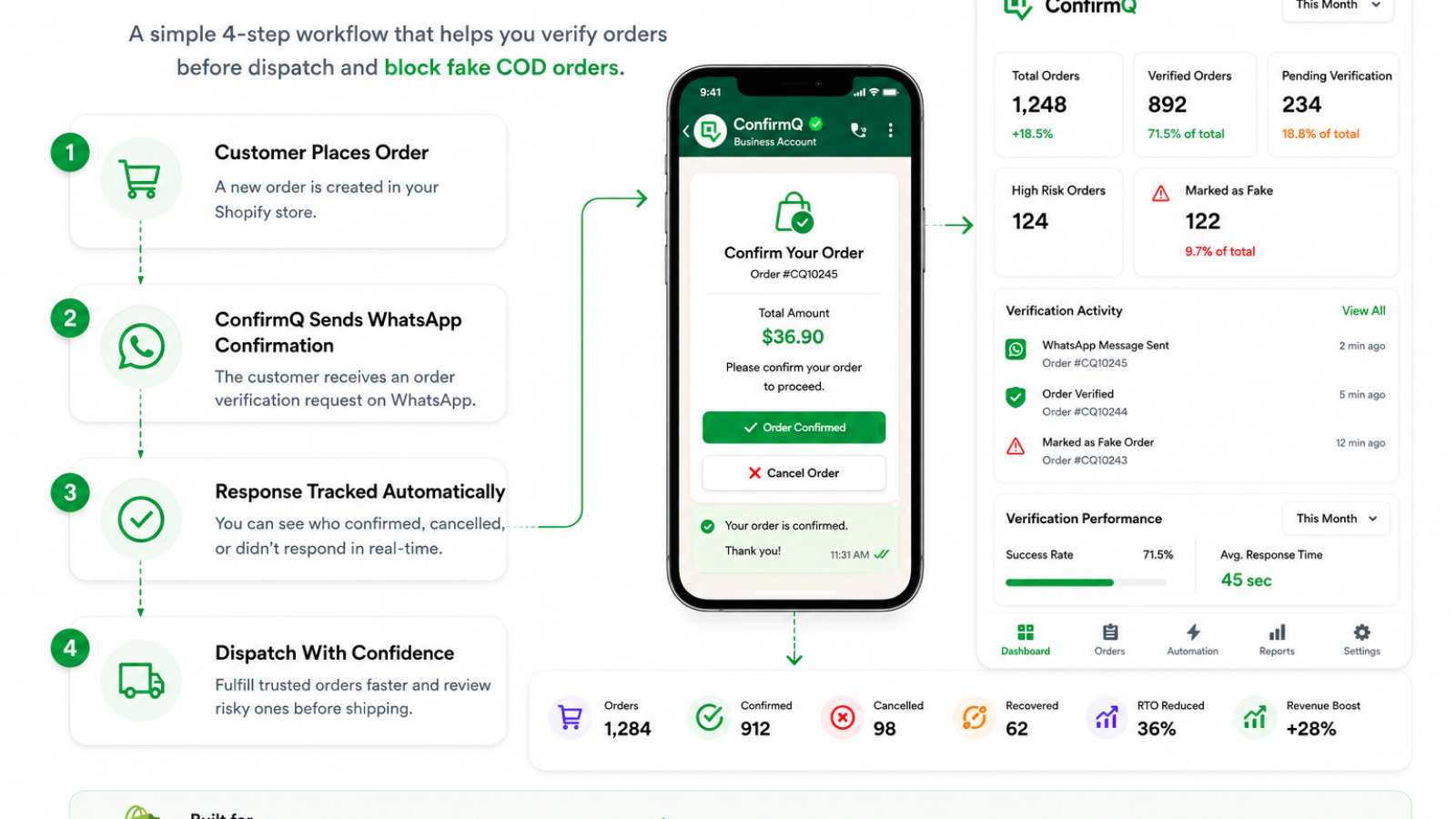
Fake COD orders are stopped by confirming purchase intent before you ship. An automated WhatsApp message sent at checkout asks the customer to confirm or cancel, logs the reply against the order, and flags customers with a history of cancellations. Unconfirmed orders are held rather than dispatched, so no shipping cost is spent.
If you run a cash-on-delivery store, you already know the real cost of doing business: fake orders. A customer places an order with no intention of accepting it, your team packs and ships anyway, and the parcel comes back weeks later — shipping fees gone, packaging wasted, and a product that’s now sitting in returns instead of on a shelf.
Most WhatsApp automation tools focus on marketing: cart recovery messages, promotional broadcasts, welcome sequences. Those are useful, but they don’t solve the problem that actually drains COD merchants’ margins — orders that were never going to be honored in the first place. That’s the gap ConfirmQ was built to close.
Order Confirmation That Happens Automatically
The moment a customer checks out on your Shopify store, ConfirmQ sends them a WhatsApp message with their order number, items, total, and delivery address — and a simple poll: Yes, Confirm or No, Cancel.
No manual phone calls. No waiting on a support agent to text every customer one by one. The confirmation happens the second the order lands, and the response is logged automatically against that order. If a customer confirms, they get an instant thank-you message. If they cancel, your fulfillment team sees it immediately and skips the pack-and-ship cycle entirely — before it costs you anything.
Know Exactly Who Responded, and When
Every response ConfirmQ receives is recorded with the order number, customer name, phone number, response status, and timestamp. Your team never has to guess whether a customer confirmed — it’s all visible in one place, updated in real time.
| Method | Typical reach | Reply is trackable | Cost per order | Runs automatically |
|---|---|---|---|---|
| Phone call | Low, many calls go unanswered | Manual notes only | Staff time | No |
| SMS | Moderate | Rarely | Per message fee | Partly |
| Low for COD buyers | Open tracking only | Low | Yes | |
| WhatsApp (ConfirmQ) | High in COD markets | Yes, logged to the order | Low | Yes |
Fake Order Detection and Customer Blocking
This is where ConfirmQ goes further than a typical WhatsApp messaging tool. ConfirmQ fake order detection watches customer order history — repeated cancellations, chronic returns, suspicious patterns — and flags risky customers before you commit resources to their next order.
You can add internal staff notes to a flagged customer and block them outright. If a blocked customer tries to order again, your team gets a WhatsApp alert immediately, so you decide whether to process it — not your storefront on autopilot. For COD stores specifically, this is often the single highest-leverage feature: it stops the same repeat offenders from costing you money order after order.
Automation Flows That Run Without You
Beyond order confirmation, ConfirmQ lets you build custom WhatsApp workflows triggered by store activity — abandoned carts, delayed responses, fulfillment status changes. Set your triggers, add conditions, set a delay, and let ConfirmQ send the right message at the right time: a follow-up nudge, a discount code, a shipping update, whatever the workflow calls for. Once it’s built, it runs on its own — no repetitive manual messaging.
Shipment Tracking, Rider Assignment, and Custom Messages
ConfirmQ also covers what happens after confirmation. In the Shipments section, you can assign riders, update delivery status, mark returns, and send WhatsApp delivery updates with one click — and use Shopify order tags (like “Rider: Ali”) so your team always knows who’s responsible for which parcel.
Every message ConfirmQ sends — confirmations, cancellations, fulfillment updates, alerts — is fully editable, so your customers hear from your brand, not a generic bot script. And you’re not limited to one admin number: add your whole team’s WhatsApp numbers so everyone gets notified the moment a new, confirmed, cancelled, or blocked-customer order comes in.
One Dashboard for Everything
The ConfirmQ dashboard brings all of this together: total messages sent, confirmations, cancellations, active automation flows, delivery performance, and real-time order activity, all in one screen. And when you need the numbers for a bigger picture, Reports & Analytics tracks total orders, revenue, confirmations, cancellations, payments, returns, and the actual dollar cost of cancellations and returns — exportable to Excel in one click.
Built for COD Stores, Not Just WhatsApp Marketing
If your biggest challenge is generic cart-recovery messaging, plenty of tools can help with that. But if your biggest challenge is fake orders, chronic-return customers, and COD-specific fulfillment risk, you need more than a marketing automation layer — you need order verification and risk control built into the workflow itself. That’s the problem ConfirmQ was built to solve.
Get Started
Install ConfirmQ on your Shopify store (see pricing), connect your WhatsApp number in minutes, and start confirming orders, tracking shipments, and blocking risky customers automatically — before they cost you money.
Install ConfirmQ on the Shopify App Store →
Frequently Asked Questions
How do I verify COD orders on Shopify?
You can verify COD orders automatically by sending a WhatsApp confirmation message the moment an order is placed. ConfirmQ does this instantly — the customer replies Yes or No, and the response is logged against the order before you pack anything.
Can Shopify automate WhatsApp order confirmations?
Yes. Using a WhatsApp automation app like ConfirmQ, your Shopify store can automatically send order confirmation messages, track customer responses, and update order status — all without any manual work.
Does WhatsApp reduce fake orders on Shopify?
WhatsApp confirmation is one of the most effective ways to eliminate fake COD orders. When customers must actively confirm via WhatsApp, unintended or fraudulent orders get filtered out before shipping costs are incurred.
Is WhatsApp better than SMS for order confirmation?
For most COD merchants in Pakistan, India, and the Middle East, WhatsApp significantly outperforms SMS. WhatsApp has near-universal adoption, supports rich message formatting, and allows customers to respond with a simple tap — making confirmation rates much higher than SMS.
How does ConfirmQ detect fake customers on Shopify?
ConfirmQ tracks order history for each customer. If someone repeatedly cancels or returns orders, ConfirmQ flags them as a risky customer. You can add internal staff notes and block them — and get an instant WhatsApp alert if they try to order again.
Related: How to Identify Fake Orders on Shopify: 9 Warning Signs Before You Ship

