
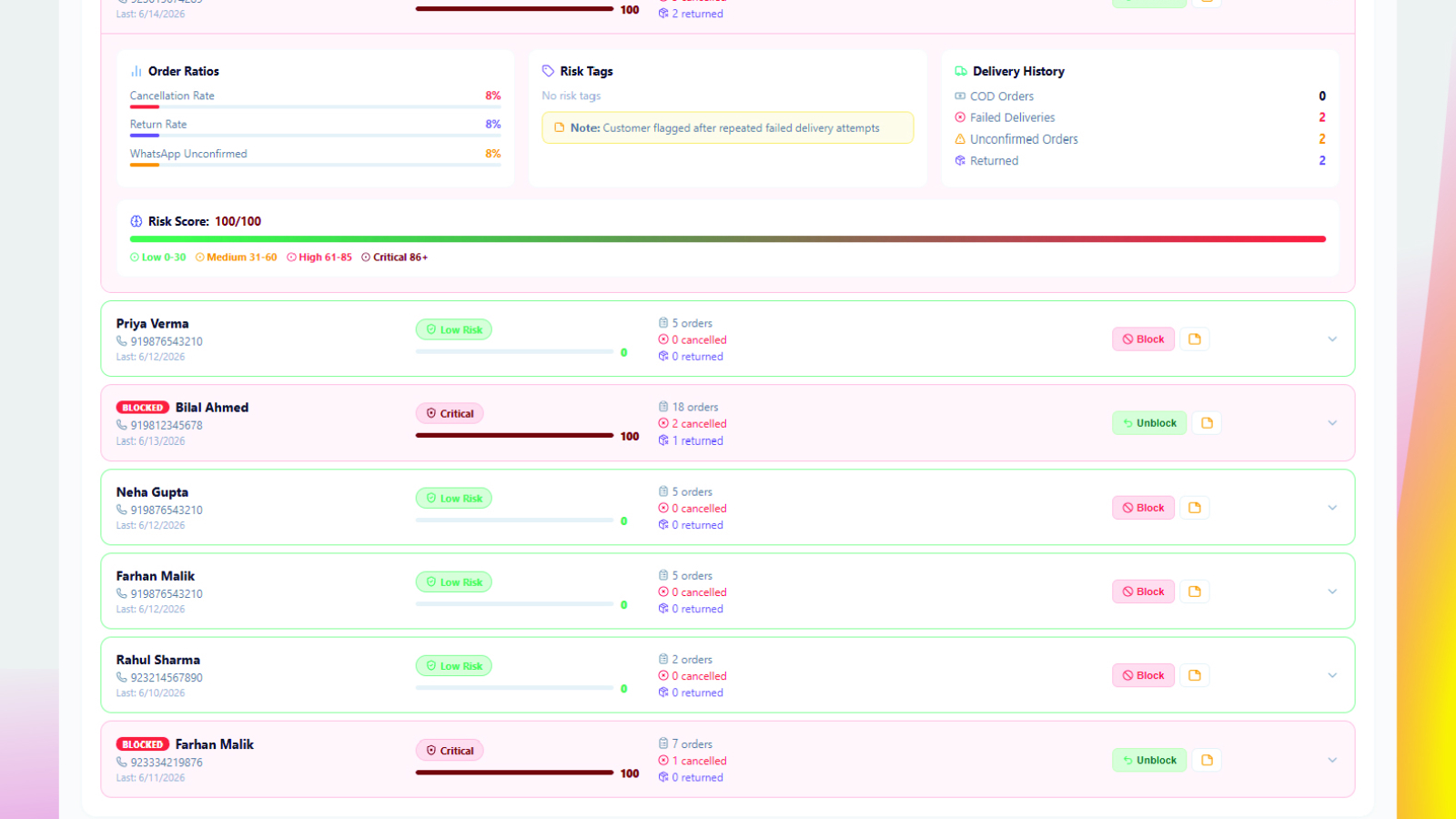
A fake order on Shopify is a cash-on-delivery order placed with no intention of accepting delivery. The clearest warning signs are a malformed phone number, a vague address, a mismatched name and email, an unusually large first order, and no reply to confirmation contact. Verifying on WhatsApp before dispatch catches most of them.
Every cash-on-delivery merchant learns this lesson the expensive way. An order comes in, your team packs it, the courier collects it, and three weeks later the parcel comes back unopened. You have paid forward shipping, return shipping, packaging, and staff time on a sale that never existed.
The frustrating part is that most fake orders leave a trail before they cost you anything. The signals are there at checkout, in the customer data, and in the ordering pattern. The problem is that nobody has time to inspect 200 orders a day by hand.
This guide breaks down the warning signs that separate a real buyer from a fake order, and how to catch them systematically instead of relying on gut feel.
What Is a Fake Order? (Definition)
A fake order is an order placed with no genuine intention of paying for or accepting it. On a cash-on-delivery store the term covers anything from a deliberate prank to a real customer who changes their mind, because in every case the parcel ships, the delivery fails, and the seller absorbs the cost of both legs.
The word “fake” is misleading, though. Not every failed delivery is fraud, and the five types below need different responses:
- Prank orders — placed with no intention of paying. Often uses fake names, joke email addresses, or a phone number that does not exist.
- Impulse regret — a genuine person ordered at 2am, changed their mind by morning, and simply refuses the parcel at the door.
- Competitor sabotage — bulk orders placed to tie up your inventory and shipping capacity.
- Address errors — a real customer who typed their address wrong, so the courier cannot deliver.
- Serial returners — customers who order repeatedly and refuse most of what arrives.
All five cost you money. But only the first three are malicious — the other two are recoverable with a single confirmation message.
9 Warning Signs of a Fake Order on Shopify
| Warning sign | How to check it | How reliable |
|---|---|---|
| Malformed or invalid phone number | Validate format and country code at checkout | Very high |
| Vague or incomplete address | Look for a missing street, house or area detail | High |
| Name and email do not match | Compare the order name against the email handle | Medium |
| Large first order from a new buyer | Compare against your average order value | Medium |
| Repeat orders from one number | Check order history for the same phone number | High |
| No reply to confirmation | Send a WhatsApp confirmation and wait for a response | Very high |
1. The phone number is malformed or fake
The single most reliable signal. Look for numbers with too few digits, repeated sequences like 03001111111, or obviously invented patterns like 03001234567. In COD markets the phone number is the only real point of contact — if it is fake, the order almost certainly is too.
2. The address is vague or incomplete
Real buyers want their parcel to arrive, so they give house numbers, street names, and landmarks. An address that reads only “near main market” or a single city name is either a fake order or a delivery failure waiting to happen.
3. Name and email do not match the order
Single-character names, keyboard mashing like “asdfgh”, or throwaway email domains are worth flagging. On their own they are not proof, but combined with any other signal on this list, the risk rises sharply.
4. Unusually large order value from a first-time buyer
A brand new customer ordering five times your average basket size deserves a phone or WhatsApp check before it ships. Genuine large orders survive a confirmation message. Fake ones do not.
5. Multiple orders from the same number in a short window
Three orders in ten minutes from one phone number is either a checkout bug or someone testing your store. Either way it needs a human look before dispatch.
6. The customer has cancelled or returned before
This is the highest-value signal you have, and the one most stores never check. A customer who has refused two previous deliveries will very likely refuse the third. Order history is the strongest predictor of what happens next.
7. Orders placed at odd hours with no engagement
Late-night orders are not automatically suspicious, but a 3am order from a first-time buyer who spent under thirty seconds on your site is worth confirming before you commit stock to it.
8. No response to any contact attempt
Silence is a decision. If a customer does not reply to a WhatsApp confirmation within 24 hours, treat that as an unconfirmed order rather than an approved one.
9. Delivery address far outside your normal service area
Orders from regions you rarely ship to carry higher return risk and higher shipping cost. They are not always fake, but they justify an extra verification step before dispatch.
Why Manual Checking Does Not Scale
Reading this list, you could inspect every order by hand. At ten orders a day that works. At a hundred it does not.
The bigger problem is memory. Your team cannot remember that the customer ordering today refused two parcels last month. That history lives in your Shopify admin, but nobody has time to search it before every dispatch.
This is exactly where automation earns its keep — not by replacing judgement, but by surfacing the right orders for a human to look at.
Verify Every Order Before It Ships
The most effective filter is also the simplest: ask the customer to confirm. A WhatsApp message with the order number, items, total, and a Yes or No reply option costs you nothing and filters out most bad orders before a single rupee of shipping is spent.
ConfirmQ fake order detection sends that message automatically the moment an order lands, then logs the response against the order. Your fulfillment team sees confirmed, cancelled, and no-response orders separately, so packing decisions are based on evidence rather than hope.
Track Customer History Automatically
Confirmation solves today’s order. Customer history solves the pattern.
ConfirmQ keeps a running record of cancellations, returns, and refused deliveries per customer. When someone crosses the threshold you set, they are flagged as risky. You can add internal staff notes explaining why, and block them outright if the pattern continues.
If a blocked customer tries to order again, your admin team receives an instant WhatsApp alert. Nothing ships on autopilot — a human decides.
Build the Habit Before the Volume Arrives
Most merchants only take fake orders seriously after a painful month. The stores that stay profitable are the ones that put verification in place while volume is still manageable.
Start with three things: confirm every COD order before packing, track cancellations per customer, and block repeat offenders. Those three habits alone eliminate the majority of avoidable losses.
Get Started
Install ConfirmQ on your Shopify store, connect your WhatsApp number, and start verifying orders in minutes. See pricing or how the workflow fits your fulfillment process.
Install ConfirmQ on the Shopify App Store →
Frequently Asked Questions
What does “fake order” mean?
A fake order is an order placed with no genuine intention of paying for it or accepting delivery. On cash-on-delivery stores the term is used broadly, covering deliberate prank and competitor orders as well as genuine customers who change their mind before the parcel arrives.
Why do people place fake orders?
Motives vary and most are not criminal. The common ones are impulse buying followed by regret, pranks using invented names and numbers, competitor sabotage intended to tie up stock and shipping capacity, automated bot traffic, and simple address or phone typing errors that make delivery impossible. Because cash on delivery asks for no payment at checkout, placing an order carries no consequence, which is what makes all of these so much more frequent than on prepaid stores.
How do I identify fake orders on Shopify?
Check for malformed phone numbers, vague addresses, mismatched names and emails, unusually large first-time orders, and prior cancellations from the same customer. The most reliable single method is sending a WhatsApp confirmation before shipping — genuine buyers reply, fake orders do not.
Can Shopify detect fake orders automatically?
Shopify has built-in fraud analysis for prepaid card orders, but it does not cover cash-on-delivery fraud, which works differently. COD fake orders need order confirmation and customer history tracking, which requires an app like ConfirmQ.
What is the most common sign of a fake COD order?
An invalid or unreachable phone number. In COD markets the phone is the only real point of contact, so a fake number almost always means a fake order. The second most common sign is a prior cancellation or refused delivery from the same customer.
Should I cancel orders that do not reply to confirmation?
Not immediately. Send one follow-up after a set delay, then hold the order rather than shipping it blind. Many customers reply on the second message. Holding costs you nothing; shipping unconfirmed costs you both ways.
How do I block a fake customer on Shopify permanently?
Shopify has no native customer blocking for COD. ConfirmQ lets you flag and block customers based on their cancellation and return history, and sends your admin team an instant WhatsApp alert if a blocked customer attempts a new order.
Do fake orders affect my Shopify store metrics?
Yes. Fake orders inflate your gross sales figures while destroying net margin, distort conversion and repeat-purchase data, and consume inventory that genuine customers could have bought. They also damage your standing with courier partners when return rates climb.

