
COD reporting measures what cash-on-delivery orders actually earn once cancellations and returns are deducted. The metrics that matter are confirmation rate, cancellation rate, return rate, and total failure cost. Shopify reports gross sales at checkout, so COD stores must track collected revenue separately to see their real margin.
Open your Shopify analytics after a good month and you will see a number that feels excellent. Total sales, up. Orders, up. Average order value, healthy.
Then you check your bank balance and it does not match the story.
For cash-on-delivery stores, that gap is not an accounting mistake. It is the difference between an order being placed and an order being paid for — and standard ecommerce reporting was never built to show it. Shopify counts the sale the moment the customer clicks buy. With COD, the money only becomes real when the courier hands over the parcel and collects the cash, which might be twelve days and two delivery attempts later.
This guide covers the metrics COD merchants actually need, how to calculate your real margin after cancellations and returns, and what to do once you can finally see the numbers.
Why Standard Ecommerce Reporting Fails COD Stores
Prepaid ecommerce has a clean funnel. Payment is captured at checkout, so revenue reported is revenue received. Refunds are the only leak, and they show up clearly.
COD breaks that model in three places:
- Revenue is provisional. An order sitting in your dashboard at full value may never be paid. Until delivery is confirmed, it is a forecast, not income.
- Failed orders still cost money. A cancelled or refused parcel is not neutral. You have already paid forward shipping, packaging, and staff time. Some couriers also charge return shipping. A refused order is worse than no order at all.
- The loss is invisible. Shopify shows the cancelled order as cancelled. It does not tell you what that cancellation cost you, or add it up across the month.
That third point is the one that quietly hurts. Most COD merchants can tell you their sales figure. Very few can tell you what their failed orders cost last month — which is exactly the number that decides whether the business is profitable.
The 7 COD Metrics Worth Tracking
| Metric | What it tells you | Why Shopify alone misses it |
|---|---|---|
| Confirmation rate | Share of orders customers actively confirm | Shopify has no confirmation step for COD |
| Cancellation rate | Share cancelled before dispatch | Counted as sales until cancelled |
| Cancelled loss | Money tied up in orders that never ship | Not reported as a cost |
| Return rate and returns loss | Parcels refused or returned after dispatch | Shipping paid twice, not netted off |
| Total failure cost | Combined cost of cancellations and returns | No single view exists |
| COD versus prepaid split | Which payment type actually earns | Reported together as gross sales |
1. Confirmation rate
Of the orders that came in, how many did the customer actively confirm before you packed them? This is your single best leading indicator. Orders confirmed by the buyer before dispatch are dramatically less likely to be refused at the door. If your confirmation rate is below 70%, your dispatch queue is full of guesses.
2. Cancellation rate
Orders the customer cancelled when asked to confirm. Counter-intuitively, a rising cancellation rate is often good news — it means you are catching dead orders before you ship them rather than after. A cancellation costs you a message. A refused delivery costs you a round trip.
3. Cancelled loss
The money attached to cancelled orders. Track it as a running total, not per order. A 6% cancellation rate sounds tolerable until you see it expressed as PKR 180,000 of stock that sat reserved instead of selling.
4. Return rate and returns loss
Orders that shipped, reached the customer, and came back. These are the expensive ones — you have paid shipping in both directions plus handling. Watch the value, not just the count. Ten returned low-margin items may cost less than two returned premium ones. Our guide on reducing COD return rates covers how to bring this number down.
5. Total failure cost
Cancelled loss plus returns loss, combined into one figure. This is the number to put in front of your team every week. It converts an abstract percentage into a concrete amount of money that left the business.
6. COD versus prepaid split
What share of orders are cash on delivery versus card? This ratio drives your working capital needs and your risk exposure. If you run promotions that nudge buyers toward prepayment, this is the metric that tells you whether they worked.
7. Delivery charges and tax
Easy to overlook and material at volume. If delivery charges are bundled into the collected amount, your gross revenue figure is inflated by money that belongs to the courier. Track it separately or your margin calculation will be wrong every month.
How to Calculate Your Real COD Margin
Once you have those figures, the calculation is straightforward:
Real revenue = Collected from delivered orders − delivery charges − tax
Failure cost = Cancelled loss + returns loss + return shipping paid
True COD margin = Real revenue − COGS − failure cost
Run it once and the result is usually uncomfortable. Stores that believe they operate at a 30% margin often land closer to 18% after failed orders are priced in. That is not a reason to panic — it is the first honest baseline you have had, and you cannot improve a number you have never measured.
Turning Numbers Into Decisions
Reporting is only worth the effort if it changes what you do on Monday. Three patterns to look for:
- High cancellations concentrated on one product. Usually a pricing, sizing, or product-page expectation problem rather than a fraud problem. Fix the listing before you blame the buyers.
- Returns clustered in one city or postcode. Often a courier performance issue, not a customer issue. Worth a conversation with your logistics provider, backed by the actual figures.
- Repeat customers appearing in your returns. A small number of buyers frequently account for a large share of refused parcels. Identifying them is the fastest single win available — see the warning signs of fake orders for what to look for.
Why Exporting to Excel Still Matters
Dashboards are for spotting trends. Spreadsheets are for arguments.
When your courier invoice does not match your records, when your accountant needs order-level detail for a tax filing, or when you want to pivot returns by city and product at the same time, you need the raw rows. An export that includes order number, customer, contact, date, quantity, amount, delivery charges, tax, tracking, fulfilment status, confirmation response, return status and payment method gives you everything required to reconcile against courier and bank statements line by line.
Most COD disputes with logistics partners are won or lost on whether you can produce that file.
How ConfirmQ Reports Handles This
ConfirmQ was built around COD order confirmation, which means the reporting layer already knows something Shopify does not: whether the customer actually said yes.
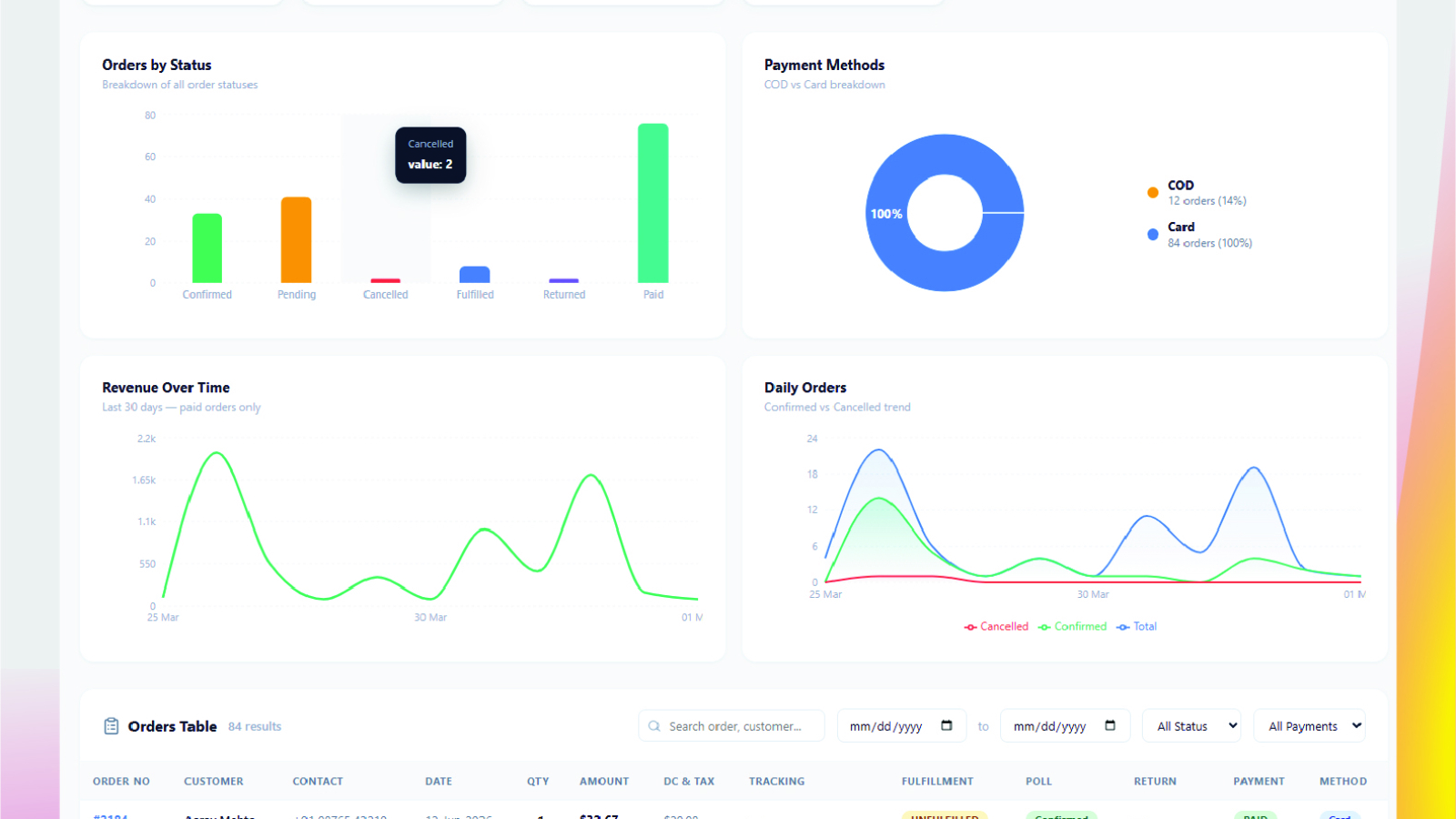
The Business Reports screen brings the metrics above into one view — total and confirmed orders, cancellations captured through the WhatsApp confirmation poll, fulfilment and payment status, returns, and the cancelled and returns loss combined into a single total failure cost. Alongside those sit an orders-by-status breakdown, a COD versus card split, revenue over time, and a daily confirmed-versus-cancelled trend.
Underneath is a filterable order table with date range, status and payment filters, showing delivery charges and tax as separate columns and each customer’s confirmation response against their order. Filtered totals update as you narrow the view, so you can isolate a single week or a single payment type and immediately see revenue, order count, average order value and quantity for that slice. Any view can be exported to Excel for reconciliation.
You can see the full feature set on the ConfirmQ features page, or read how the confirmation workflow fits together from checkout to delivery.
Start With One Number
If you do nothing else after reading this, calculate your total failure cost for last month. Cancelled order value plus returned order value plus the shipping you paid on both.
Put it next to your reported revenue. That ratio is the health of a COD business in a single line, and most merchants have never seen it. Once it is visible, every decision about confirmation, courier selection and repeat-offender blocking has a number attached to it.
Frequently Asked Questions
Why does Shopify report higher revenue than I actually collect on COD?
Shopify records the order value when the order is placed. With cash on delivery, payment only happens at handover, so cancelled and refused orders remain counted as sales in the standard reports until they are manually cancelled. The gap is your failed order volume.
What is a good COD confirmation rate?
It varies by market and product category, so treat any published benchmark with caution. The more useful approach is to measure your own baseline for a month, then track whether it improves after changing your confirmation timing or message wording.
Is a high cancellation rate bad?
Not necessarily. Cancellations caught before dispatch save you money. What matters is where the order fails: cancelled before packing is cheap, refused at the doorstep is expensive. Watch the ratio between the two rather than cancellations alone.
Should delivery charges count as revenue?
Only the portion you keep. If the courier collects the full amount and bills you for shipping, the delivery charge is pass-through money. Tracking it as a separate column keeps your margin calculation honest.
How often should I review COD reports?
Weekly for confirmation and cancellation rates, since those respond quickly to changes in your messaging. Monthly for failure cost and true margin, which need enough volume to be meaningful.
Ready to see your real COD numbers? ConfirmQ confirms every order over WhatsApp before you ship and reports on what the failures cost you. Install ConfirmQ from the Shopify App Store or view pricing plans.
Related: Stop Fake COD Orders on Shopify With WhatsApp Automation

