
On a prepaid store, a shipment tracking update is customer service. On a cash-on-delivery store it is loss prevention. The customer has not paid yet, and every day a parcel moves in silence is a day they forget why they ordered, lose confidence that it is coming, or spend the cash on something else. By the time they ask “where is my order”, the refusal has usually already been decided.
Most order tracking advice is written for stores that have already been paid. In that world, tracking updates reduce support tickets. The parcel is going to be accepted either way, because the money moved at checkout. Notifications are a courtesy that saves your team some time.
On cash on delivery, none of that holds. The transaction is not finished when the parcel ships. It is finished when someone opens a door and hands over cash. Everything between dispatch and that doorstep is still risk you are carrying, and tracking communication is the only tool you have left to protect it.
A Tracking Update on COD Is Not Customer Service
Consider what actually happens after dispatch on a COD order. The customer ordered days ago, possibly on impulse, possibly late at night, possibly from an ad they no longer remember clicking. They owe you money they have not yet parted with. Nothing binds them to the purchase except intention, and intention decays.
Then the parcel arrives unannounced. A rider calls from an unknown number asking for cash. If the customer has heard nothing since checkout, that call is an interruption rather than an expected event, and the easiest answer is no.
| Prepaid store | COD store | |
|---|---|---|
| Money moves at | Checkout | The doorstep |
| Tracking updates reduce | Support tickets | Support tickets and refusals |
| Silence costs you | Goodwill | Goodwill, shipping both ways, and the sale |
| A failed delivery is | A reschedule | Usually an RTO |
This is the part most stores get wrong. They invest heavily in confirming the order before dispatch, which is correct, and then go quiet for the five to ten days that decide whether the parcel is accepted. Confirmation gets the order onto the van. Tracking communication gets the cash off the doorstep.
Why “Where Is My Order” Is a Warning, Not a Question
On a prepaid store, a customer asking where their order is has a straightforward information gap. Answer it and they are satisfied.
On COD, the same message usually means something else. The customer is re-evaluating. They are wondering whether the store is real, whether the parcel is genuinely coming, and whether they still want to pay for it. The question is polite, but underneath it sits doubt, and doubt is what turns into a refusal at the door.
Treat your tracking enquiry volume as a leading indicator rather than a support metric. If a meaningful share of customers are asking where their parcel is, they are telling you your post-dispatch communication is not reaching them — and a portion of those same orders will come back as return to origin a week later.
The goal is not to answer those messages faster. It is to make them unnecessary.
The Four Moments That Actually Need a Message
Couriers generate a lot of scan events. Most of them are meaningless to a customer, and forwarding all of them trains people to ignore your messages — which is expensive, because you need them reading the one that matters.
Four moments carry real weight.
1. Dispatched, with the amount stated
This message does the heaviest lifting. It converts an abstract order into a physical parcel that exists and is moving. Include the tracking number, the courier name, and — most importantly — the exact cash amount due. The single most common cause of doorstep disputes is a customer who did not expect the total, including delivery charges.
2. Out for delivery
Sent on the morning of the attempt, this is the message that gets cash ready and gets someone to stay home. It is also your last practical chance to catch a problem before the rider is standing outside. A customer who replies “I am at work today, can it come tomorrow?” has just saved you a failed attempt.
3. Delivery attempt failed
This is the moment that decides the outcome of the order, and it is the one most stores never automate. More on it below.
4. Delivered
Closes the loop, confirms the cash was collected from your side, and is the natural place to ask for a review or offer a reorder. It also surfaces disputes early, when a parcel is marked delivered but the customer says otherwise.
Everything else — arrived at hub, in transit, out for scan — belongs in a tracking page the customer can check if they want, not in their WhatsApp.
The Failed Attempt Is Where Orders Are Won or Lost
Most couriers make two or three delivery attempts before returning a parcel to the sender. Between those attempts sits a window, usually a day or two, in which the order can still be rescued.
Almost nobody uses it. The failed attempt gets logged in the courier panel, nobody looks at the courier panel, and the parcel quietly completes its journey back to the warehouse. The store discovers the loss when the RTO arrives, at which point the shipping has been paid twice and the order is dead.
A first failed attempt is rarely a refusal. The common causes are mundane: the customer was out, the rider called an unanswered number, nobody had cash on hand, the address was slightly wrong. All of those are fixable within a day — but only if someone reaches the customer while the parcel is still in the city.
An automated message on the first failed attempt, asking whether to retry tomorrow and confirming the address, recovers orders that would otherwise be written off. If you automate one thing after dispatch, automate this.
What Courier Status Codes Do Not Tell You
Courier tracking data is operational data. It was designed to run a logistics network, not to explain anything to a customer, and the gap between the two causes real problems.
- Statuses are inconsistent between couriers. If you ship with more than one, the same real-world event arrives under different labels. Mapping them to a small set of plain-language customer statuses is necessary work.
- “Undelivered” hides the reason. Customer refused, nobody home, wrong address and no cash available are entirely different problems with different fixes, and many networks flatten them into one code.
- Scans lag reality. A parcel can sit for a day before the status catches up. Never promise a delivery date based purely on a scan event.
- “Delivered” is not always delivered. Parcels get marked delivered when left with a neighbour, a guard, or a family member. If your reconciliation relies on that status alone, disputes will surprise you.
Translate courier language into customer language before it reaches anyone. “Consignment booked at origin facility” means nothing to a buyer. “Your parcel has left our warehouse” does.
Writing Tracking Messages People Actually Read
Tracking messages are transactional, and transactional messages earn attention by being genuinely useful rather than promotional.
State the amount due in every message after dispatch. Not once, every time. The customer needs to have the right cash in hand at an unpredictable moment, and repeating the figure is the cheapest way to prevent a refusal over a number.
Name the courier. In COD markets buyers are wary of unknown numbers calling about parcels, and there are enough delivery scams that caution is reasonable. Telling them which company to expect makes the rider’s call credible.
Keep it to one screen, and make every message repliable. A tracking update the customer cannot answer wastes the one advantage WhatsApp has over email and SMS. Half your delivery problems arrive as replies to a notification, and only if replying is possible.
Do not bundle marketing into a delivery notification. It is the fastest way to get a business number blocked or reported, and the number carrying your tracking updates is usually the same one carrying your order confirmations. Losing it costs far more than a promotion earns.
How ConfirmQ Handles Shipment Tracking
ConfirmQ treats tracking as the second half of the same job as confirmation, not a separate tool.
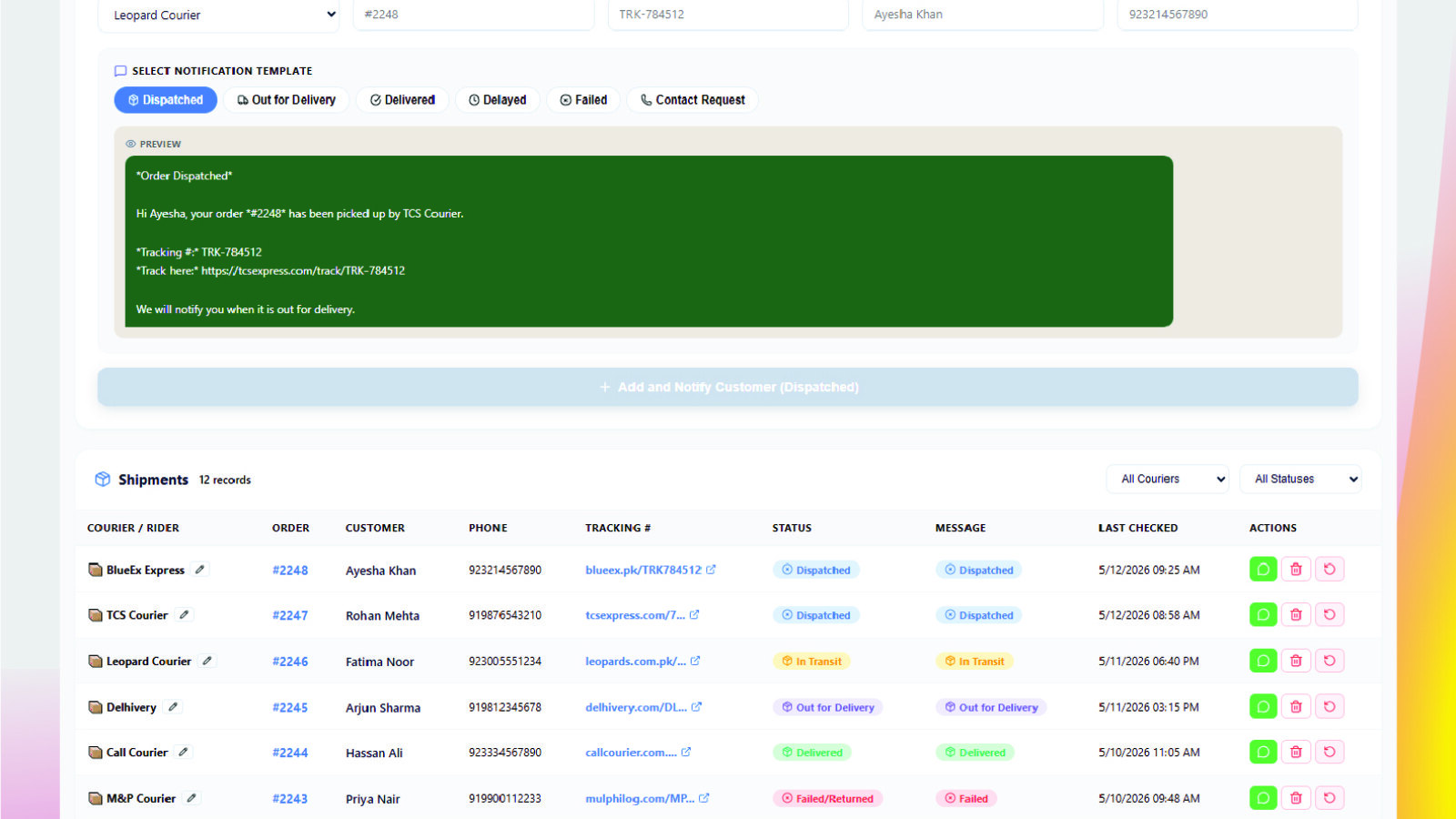
Shipment tracking connects to courier networks including Leopards and TCS, pulls status updates automatically, and maps them to plain-language stages so you are not forwarding raw scan codes to customers.
Order tracking keeps the full journey of every order on one screen — confirmed, dispatched, in transit, delivered or returned — so a failed attempt is visible the same day rather than discovered when the parcel comes back.
Automation flows trigger the messages above on courier status changes, including the failed-attempt message that most stores never send. Custom message templates let you set the wording, insert the amount due and the courier name, and preview before anything goes out.
Because confirmation and tracking run in the same system, an order refused at the door is recorded against the same customer who confirmed it, which feeds risk scoring and your COD reporting. You can see the whole picture on the workflow page or browse every ConfirmQ feature.
Measuring It Properly
Four numbers tell you whether post-dispatch communication is working.
- Tracking enquiry volume — how many customers ask where their order is. This should fall as your notifications improve, and it is the easiest signal to read.
- First-attempt delivery rate — the share of parcels delivered without a second attempt. This is the number proactive notifications move most directly.
- Failed-attempt recovery rate — of parcels that failed once, how many were delivered rather than returned. If you are not measuring this, you are almost certainly losing orders you could have saved.
- RTO rate after dispatch — parcels returned as a share of parcels shipped, tracked separately from pre-dispatch cancellations, because the two have completely different causes and fixes.
Keep pre-dispatch and post-dispatch failures apart in your reporting. An order cancelled before packing costs you a message. An order returned after dispatch costs you shipping in both directions and the handling in between. Blending them into one “cancellation rate” hides which half of your process is actually leaking money. Our guide on what COD cancellations and returns actually cost covers how to separate them properly.
Where to Start
Turn on two messages first: dispatched with the amount due, and out for delivery. Run them for two weeks and watch your tracking enquiry volume and first-attempt delivery rate.
Then add the failed-attempt message. It is the highest-value automation after dispatch and the one almost nobody runs, which makes it the cheapest advantage available to a COD store right now.
Only after those three are working should you build a branded tracking page or a full notification ladder. Most stores that struggle with RTO do not have a courier problem. They have a silence problem, and silence is much cheaper to fix.
Frequently Asked Questions
Once an order is fulfilled and a tracking number is attached, the app monitors the courier’s status updates and sends the customer an automated WhatsApp message when the shipment reaches a stage that matters, such as dispatch, out for delivery, a failed attempt or delivery. It needs the customer’s phone number and their agreement to be contacted on WhatsApp.
Because the customer has not paid yet. On a prepaid order, tracking updates mainly reduce support enquiries, since the parcel will be accepted either way. On COD the customer can still refuse the parcel at the door, so keeping them informed and expecting the delivery directly protects the sale.
Four is usually the practical limit: dispatched, out for delivery, failed attempt if one occurs, and delivered. Forwarding every courier scan trains customers to ignore your messages, which matters because you need them to read the out-for-delivery one.
Message the customer the same day, before the courier makes its final attempt. Ask whether to retry tomorrow and confirm the delivery address. A first failed attempt is usually caused by the customer being out or not having cash ready rather than a refusal, and both are fixable inside the retry window.
Yes, in every message after dispatch. Doorstep disputes frequently come from a customer who did not expect the total once delivery charges were added. Repeating the exact amount gives them time to have the right cash ready when the rider arrives.
Yes. ConfirmQ connects to courier networks including Leopards and TCS, reads their status updates, and maps them to plain-language stages before sending. Since each courier labels events differently, mapping them to a common set of customer-facing statuses keeps your messaging consistent across couriers.
Want fewer parcels coming back? ConfirmQ confirms COD orders before dispatch, then keeps customers informed on WhatsApp until the cash is collected. Install ConfirmQ from the Shopify App Store or view pricing plans.
Related: Why RTO Increases on Shopify COD Orders (And How to Reduce It)

